


starter button replacement

MI-Bill

Member
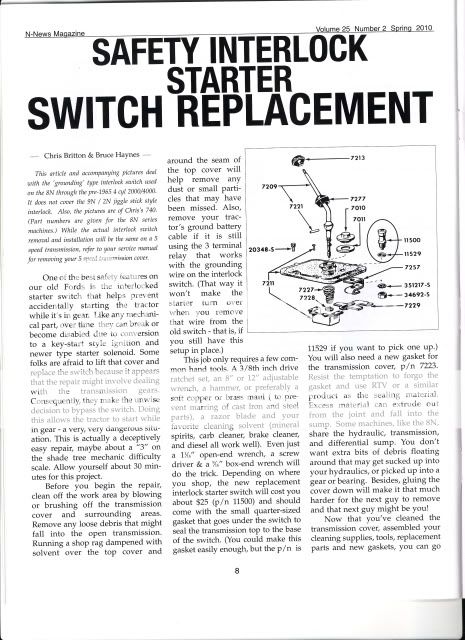
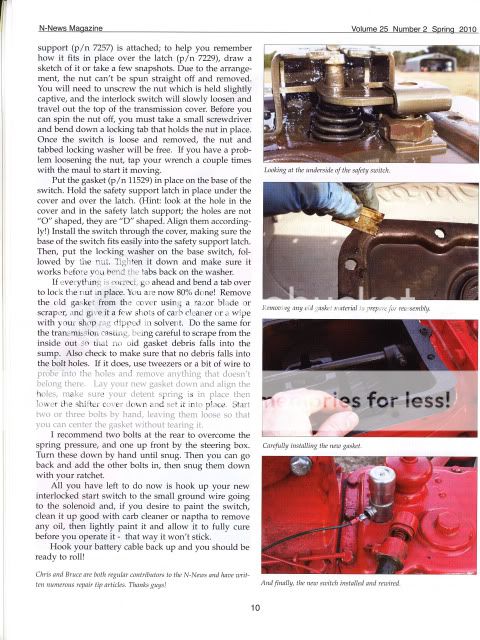
Any trick to replacing the starter button on my 48 8N. Old one is sticking. Shift lever in neutral before removing?
 
" Any trick to replacing the starter button on my 48 8N."

Yea.

Don't let the detent spring fall in the gear box!

" Shift lever in neutral before removing?"

It's easier that way.

See the article.
IMG-1.jpg

IMG_0002.jpg

75 Tips
 
Tnx Zane.

Chris & I discovered that we both were replacing starter switches at the same time so we co-authored the article.
 
I've read that article and replaced several of those switches.
I appreciate all the effort!

Is there any way to link a full sized version of it for those of
us who don't see so well anymore? Maybe a post in "Articles"
here on YT with a link to it?
 
" Is there any way to link a full sized version of it for those of

us who don't see so well anymore? Maybe a post in "Articles"

here on YT with a link to it?"

IIRC, when Kim tried to do that a few years ago, she couldn't get the article to scan. Might be worth a try again though. I'll ask.
 
Function I learned a few years back, and always assumed I was the last one to learn of it...

On your keyboard hold down the CTRL button and then use the scroll wheel on your mouse at the same time, will zoom the whole page in or out, helps in reading things like that article.
 
(quoted from post at 10:40:24 03/23/16) Function I learned a few years back, and always assumed I was the last one to learn of it...

On your keyboard hold down the CTRL button and then use the scroll wheel on your mouse at the same time, will zoom the whole page in or out, helps in reading things like that article.

don't be so hard on yourself. i'm a computer guy since 1980, and i didn't know that trick for years either. but it should be noted that it only works with certain browsers - mine (vivaldi, which is based on chrome) is not one of them ;)

the catch is - when u reduce the size of an image, u lose detail. if u later expand the resized image, the lost detail is still not there, and u tend to end up with something blurry as a result.

u can always upload the original image to an image hosting site like http://tinypic.com or http://imgur.com and then link to it there.
 
Thanks 64frd4000ind, yes its a neat trick and I use it.
I lose a lot of detail when I do though.

A couple related tricks CTRL and the +/- keys work too
and CTRL and the number 0 jumps to the default (no) zoom.
 
(quoted from post at 06:40:24 03/23/16) Function I learned a few years back, and always assumed I was the last one to learn of it...

On your keyboard hold down the CTRL button and then use the scroll wheel on your mouse at the same time, will zoom the whole page in or out, helps in reading things like that article.

Thank you. Never knew this. Not only learn about tractors here, even some computer tricks.
 
(quoted from post at 13:58:34 03/23/16)
(quoted from post at 10:40:24 03/23/16) Function I learned a few years back, and always assumed I was the last one to learn of it...

On your keyboard hold down the CTRL button and then use the scroll wheel on your mouse at the same time, will zoom the whole page in or out, helps in reading things like that article.

don't be so hard on yourself. i'm a computer guy since 1980, and i didn't know that trick for years either. but it should be noted that it only works with certain browsers - mine (vivaldi, which is based on chrome) is not one of them ;)

the catch is - when u reduce the size of an image, u lose detail. if u later expand the resized image, the lost detail is still not there, and u tend to end up with something blurry as a result.

u can always upload the original image to an image hosting site like http://tinypic.com or http://imgur.com and then link to it there.

For the Chrome users zoom level can be controlled using the drop down options menu located in the upper right hand corner of the window. Left click on it to display the menu. Near the middle you will see the "Zoom" item along with a "+" and "-" button for increasing/decreasing the zoom level. There is also a box for entering zoom as a percentage of the current level.

TOH
 
Yesterday's Tractor Forums

We sell tractor parts! We have the parts you need to repair your tractor - the right parts. Our low prices and years of research make us your best choice when you need parts. Shop Online Today.

Back
Top